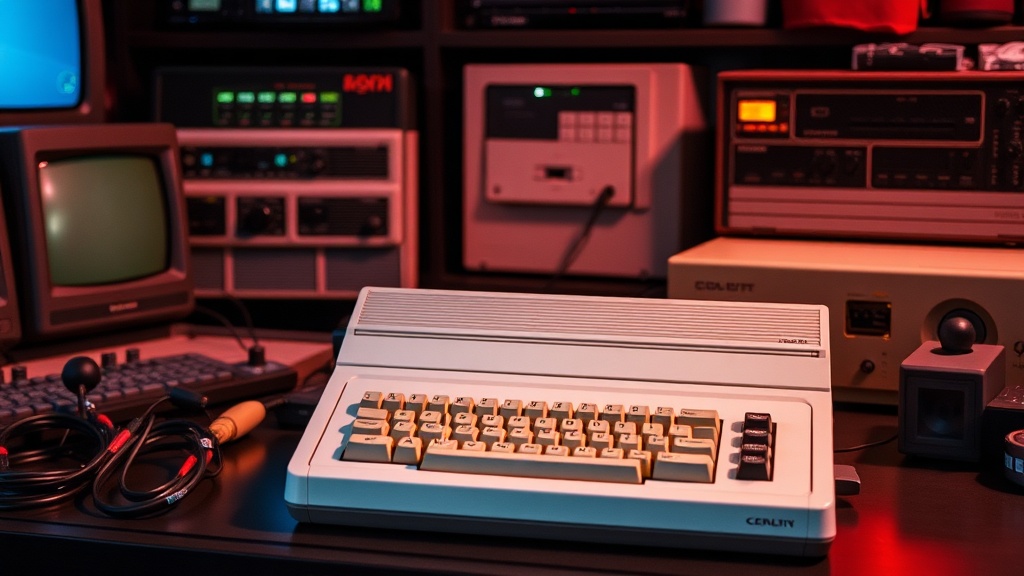
The Ultimate Guide to Collecting Vintage Commodore 64 Systems

This guide covers everything needed to start or expand a vintage Commodore 64 collection — from identifying different motherboard revisions and common hardware failures to pricing, where to buy, and how to maintain these classic machines. Whether hunting for a first C64 or looking to complete a specific hardware setup, the information here will save money, prevent costly mistakes, and help build a collection that lasts.
What Should You Look for When Buying a Commodore 64?
The first thing to check is which revision you're getting. Commodore produced several motherboard versions over the C64's 12-year production run, and they are not created equal. Early "breadbin" models (the beige case with the brown keyboard) typically fall into three categories: the 1982 Rev A motherboards (the rare "silver label" machines), the 1983-84 Rev B boards, and the 1985-86 Rev C boards. Each has different quirks, different chip configurations, and different failure points.
The silver label machines are collectible but temperamental. They used the original VIC-II video chip (MOS 6567) and early SID chips (MOS 6581) that run hot — very hot. These boards also lack the shielding and power filtering of later revisions. That said, here's the thing: they also have the most sought-after SID sound chips for musicians and chiptune artists. The 6581R4AR chips found in some late-1983 machines are particularly prized.
Later breadbin models (1984-86) and the C64C (the white/beige "slimline" case introduced in 1986) used improved motherboards with better power regulation. The C64C often came with the newer "short board" (Assy 250469) and sometimes the SID 8580 chip instead of the 6581. The 8580 runs cooler and has less noise, though many collectors prefer the "warmer" sound of the 6581. Worth noting: the C64C is generally more reliable but less valuable to serious collectors chasing that original aesthetic.
Always — always — ask about the power supply. The original Commodore "black brick" PSUs are ticking time bombs. Their design allows the 5V regulator to fail high, sending 9-12V into a machine expecting 5V. The result? Instant death for RAM chips, SID, and sometimes the CPU. If a seller includes an original PSU, budget $40-60 immediately for a modern replacement from RetroActive Electronics or a similar vendor. Don't risk it.
How Much Should You Pay for a Commodore 64 in Today's Market?
Prices vary wildly based on condition, completeness, and revision. As of 2024-2025, here's what collectors can expect to pay for working systems in North America:
| Configuration | Price Range (USD) | Notes |
|---|---|---|
| Bare C64 (console only, tested working) | $80 - $150 | Yellowing, missing badges common at lower end |
| C64 with PSU and AV cable | $120 - $200 | Modern PSU strongly recommended regardless |
| Complete in box (CIB) | $250 - $400 | Original packaging, manuals, all inserts |
| Silver label (1982, early Rev A) | $300 - $600+ | Serial under 100000, rare, condition-sensitive |
| C64C with 1541-II disk drive | $200 - $350 | The 1541-II is the most reliable Commodore drive |
| SX-64 (portable) | $400 - $800 | Built-in 5" monitor, heavy, prone to power issues |
| C64 Games System (console) | $150 - $300 | No keyboard, cartridge-only, failed commercially |
The catch? eBay prices often run 30-50% higher than local markets. Facebook Marketplace, Kijiji (in Canada), and local retro computing meetups consistently deliver better deals — though patience is required. Burlington and the broader Golden Horseshoe area have an active Commodore community; the Toronto PET Users Group hosts regular meetups and maintains a wanted/for-sale board that's far more reasonable than auction sites.
Don't overlook bundle deals. A seller clearing out a basement often has no idea what's there. A "box of old computer stuff" for $100 might contain a 1541 disk drive ($80 value), a 1702 monitor ($150-200), original software, and manuals. The monitor alone justifies the purchase. The 1702 — a professional-grade CRT with separate chroma/luma inputs — remains one of the best displays for retro gaming and computing.
What Are the Most Common Commodore 64 Problems and How Do You Fix Them?
Dead C64s usually suffer from one of four issues: failed power supplies (as mentioned), bad RAM, dead PLA chips, or capacitor failure. The PLA (Programmable Logic Array) chip is the C64's Achilles heel — it runs hot, fails without warning, and renders the machine completely dead when it goes. Modern replacements from vendors like Gideon's Logic or the PLAnkton from Sven Petersen are more reliable than original MOS parts and cost around $15-25.
RAM failures typically manifest as garbled screens, random crashes, or a black screen with the power LED on. The C64 uses eight 4164 DRAM chips (or later 4464s in some C64C models). Testing requires a known-good PLA and CPU first — swapping chips blindly gets expensive fast. A cheap logic probe or oscilloscope helps isolate which chip has failed.
Capacitor replacement is controversial. The C64's electrolytic capacitors do age, but unlike some vintage computers (Amigas, certain Macs), they don't typically leak and destroy boards. Many working C64s still run fine on 40-year-old caps. That said, recapping the power supply is non-negotiable — and if a machine shows signs of instability, the mainboard capacitors should be replaced with modern low-ESR equivalents.
Keyboard issues are common. The original key plungers use a carbon contact that degrades over time. Sticky or unresponsive keys usually respond to cleaning with isopropyl alcohol and a soft brush. Completely dead keys often need new plungers — available from 3D-printed reproductions or donor machines. The C64C keyboard is easier to service than the breadbin's, with a simpler membrane design.
Disk Drives and Storage Alternatives
The Commodore 1541 disk drive is iconic, slow, and notoriously unreliable. The original 1541 (the large beige case) uses an ALPS mechanism prone to head misalignment. The 1541-II (black case, external PSU) improved reliability significantly. Both use 5.25" floppy disks — new-old-stock disks are getting scarce and expensive ($2-5 per disk), with no guarantee they'll work 40 years later.
Modern storage solutions are a breakthrough for actually using a C64. The SD2IEC device emulates a 1541 using SD cards — load .D64 disk images instantly, no spinning rust required. For purists, the Pi1541 runs on a Raspberry Pi and offers near-perfect 1541 emulation, including copy-protected games that fail on SD2IEC. The 1541 Ultimate (a cartridge-based solution) adds RAM expansion, cartridge emulation, and Ethernet. Prices range from $30 for basic SD2IEC clones to $150+ for Pi1541 builds with OLED displays.
Where's the Best Place to Find Commodore 64 Games and Software?
Original software is a mixed bag. Common titles — think Impossible Mission, M.U.L.E., Jumpman, California Games — turn up regularly at garage sales and thrift stores for $5-20. Rare titles command serious money. A complete copy of Maniac Mansion (the Lucasfilm box with the dial-a-pirate wheel) can fetch $100-200. Ultima games with all maps and documentation regularly sell for $150+.
For collectors focused on gameplay rather than boxes, the C64 Community Forum maintains excellent resources for legally obtaining disk images of abandonware titles. The C64 Mini and full-size C64 Maxi (modern reissues from Retro Games Ltd.) include licensed game packs and HDMI output — a controversial but practical option for casual play.
Homebrew and new releases deserve attention. The C64 scene never died; it just went underground. New games — often on cartridge with professional packaging — release annually through publishers like Psytronik Software, Protovision, and RGCD. These aren't novelty items; titles like Soulless, Bear Essentials, and Sam's path rival commercial releases from the platform's peak. They typically run $20-40 and support the remaining developers keeping the platform alive.
key Accessories Worth Tracking Down
Beyond the basics, certain peripherals complete the experience. The 1702 monitor has been mentioned, but the 1084S (multisync, supports 40-column and 80-column modes) is arguably more versatile. The 1351 mouse enables GEOS and modern art packages. The Final Cartridge III — a utility ROM — adds fast load, a freezer (save any game's state), and a machine language monitor. Original units are collectible; modern reproductions work identically for a fraction of the price.
Don't ignore the datasette (cassette drive). It's painfully slow — loading a single game can take 15 minutes — but it's part of the authentic experience and enables loading software from WAV files played from a phone or computer. Many European releases only existed on cassette; North American collectors often overlook this format entirely.
Building a Commodore 64 collection is a path, not a race. Start with a working machine and a modern storage solution. Learn its quirks. Join a local user group or online community. Trade stories, ask questions, and don't be afraid to open the case. These machines were built to be repaired — not replaced. Every working C64 saved from a landfill is a small victory for computing history, and there's genuine satisfaction in keeping these beige boxes running forty years after they first hummed to life.